
SearchVector / Reporting workflows
Ein wiederholbarer Bericht beginnt mit eine klare Spezifikation
Das automatisierte SEO-Reporting vereint Datenerfassung, Interpretation, Dokumentenerstellung und -bereitstellung. Ein verbundenes Dashboard deckt nur einen Teil dieses Arbeitsablaufs ab. Entscheiden Sie, was die Leser mit dem Bericht tun müssen, bevor Sie auswählen, welche Schritte automatisiert werden sollen.
YOUR REPORT OUTLINE · LOCAL PLAN
Monthly report for seo team
- Search clicks and impressions
- Query and page changes
- Prioritized fixes with owners
Compare the last complete calendar month with the previous month. Explain different month lengths and seasonality.
Connect an authorized GSC property and verify available dates before assembling a report.
Prepare a document, review the figures and commentary, then share through your chosen channel.
- Record the project/property, exact date window, filters and source retrieval time.
- Assign a reviewer and confirm recipient access before sharing.
- Save the reviewed version and the date it was shared.
Ein wiederholbarer Bericht beginnt mit eine klare Spezifikation
Das automatisierte SEO-Reporting vereint Datenerfassung, Interpretation, Dokumentenerstellung und -bereitstellung. Ein verbundenes Dashboard deckt nur einen Teil dieses Arbeitsablaufs ab. Entscheiden Sie, was die Leser mit dem Bericht tun müssen, bevor Sie auswählen, welche Schritte automatisiert werden sollen.
Die Projektübersicht von SearchVector bietet Search Console-Klicks, Impressionen, CTR und die durchschnittliche Position als Berichtseingaben. Verwenden Sie diese Zahlen mit einer definierten Eigenschaft, einem Datumsfenster und einem Überprüfungsprozess. Geplante Prüfläufe allein begründen noch nicht die geplante Berichtszustellung.
Legen Sie fest, welche Entscheidung der Leser treffen soll, nachdem er den Bericht gesehen hat.
Erfassen Sie bei jeder Abbildung die ausgewählte Eigenschaft, Daten, Filter und Quelle.
Berichtsumfang
Wählen Sie eine Frage
Included
Legen Sie fest, welche Entscheidung der Leser treffen soll, nachdem er den Bericht gesehen hat.
Behalten Sie das Zielfernrohr bei
Included
Erfassen Sie bei jeder Abbildung die ausgewählte Eigenschaft, Daten, Filter und Quelle.
The reporting inputs inside SearchVector
Start with the selected project’s search performance. This real overview shows clicks, impressions, average CTR, average position, a daily trend and country distribution.
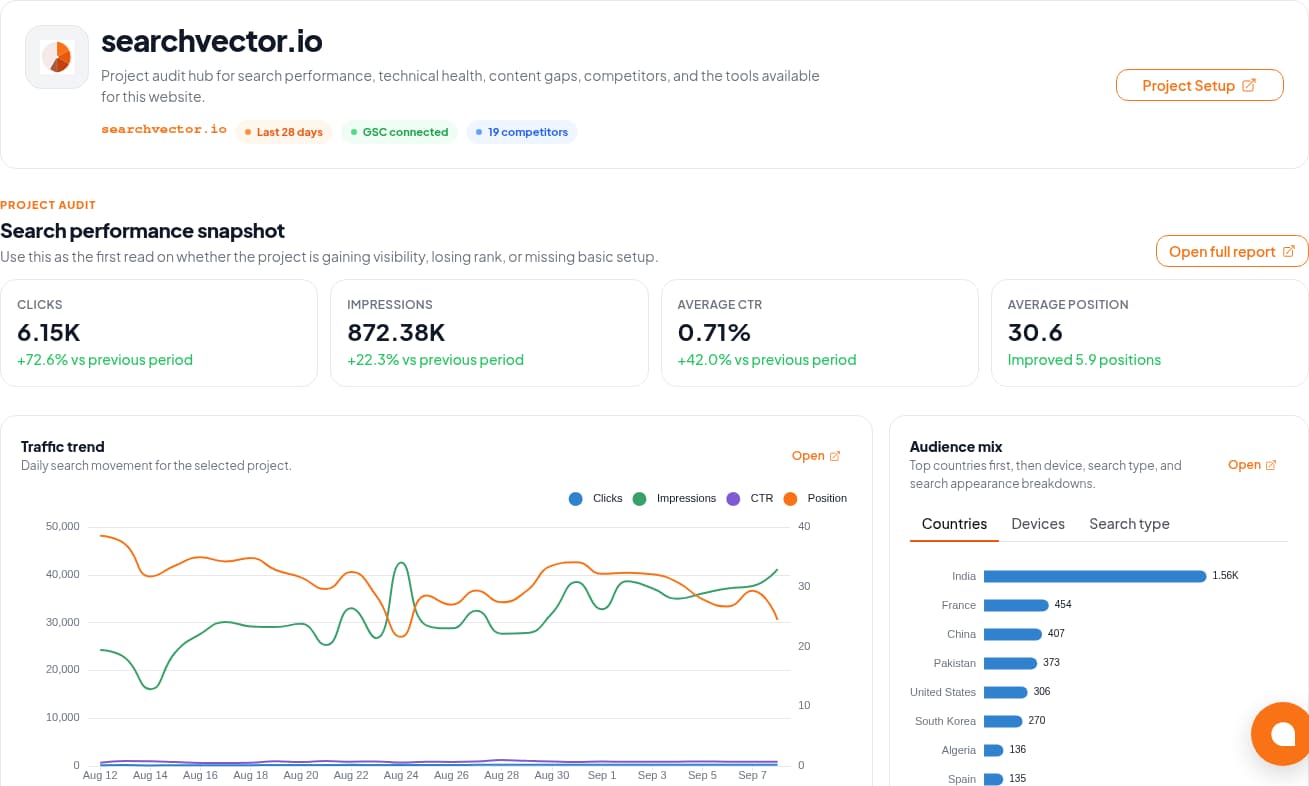
The GSC Analytics documentation describes connection and metric workflows. Verify the property and available dates in your account before using its data in a report.
Workflow
Four steps. Different responsibilities.
Use this boundary map when evaluating an automated SEO reporting workflow.
01
Retrieve
Select the authorized property and confirm date coverage. Keep search metrics separate from revenue or lead data supplied from another source.
02
Review
Explain material changes and add completed work, priorities, and owners. Avoid attributing every change to SEO activity.
03
Prepare
Use a consistent document layout and record the filters and retrieval date. Check that the exported artifact matches the reviewed data.
04
Deliver
Agree on recipients, permissions, and time zone. If automation is essential, test the actual scheduler and delivery channel before relying on it.
Design for the report that should not send
A delivery time is only one requirement. Define a stop condition and an owner for each failure.
Access disconnected
Stop the run. Ask the property owner to restore authorized access and confirm that the intended project is still selected.
Period incomplete
Label the gap. Check source availability and matching filters; a missing figure is not zero. Wait for complete data or explicitly agree on a partial report.
Delivery failed or duplicated
Keep a run identifier and delivery record in your chosen workflow. Before retrying, check whether the recipient already received that version.