
Inspect a placement before you record it
Monitor Backlinks
Paste a linking page’s HTML to check a target URL, anchor text and link attributes. Use the inspection to maintain your manual backlink inventory.
Placement inspection
See whether your target appears in the supplied HTML, with anchor text and rel attributes.
Monitor Backlinks: what your check tells you
To monitor backlinks responsibly, keep a record of where a link was placed, where it points, and what you last inspected. A list of planned placements is useful, but it is not evidence that those links are published or still live.
This inspector searches the HTML you supply for an exact target URL, ignoring fragments. It does not fetch the source website, discover every backlink to a domain, check HTTP responses or run scheduled rechecks. A page modified since you copied its HTML may now contain different links.
The source is the page carrying the link. The target is the destination on your site. Add a source URL so relative href values can be resolved correctly.
Review the visible anchor text or image alt text supplied in the HTML. An empty or generic anchor may deserve an editorial review.
Inspect rel values such as nofollow, sponsored and ugc as evidence. An absent rel attribute does not guarantee that a link will pass value or affect rankings.
The SearchVector backlink records screen stores source URL, anchor, target URL and notes for planned placements and previously published links. Use notes to record what you checked and when.
Understand the result
Source and target
Included
The source is the page carrying the link. The target is the destination on your site. Add a source URL so relative href values can be resolved correctly.
Anchor evidence
Included
Review the visible anchor text or image alt text supplied in the HTML. An empty or generic anchor may deserve an editorial review.
Link attributes
Included
Inspect rel values such as nofollow, sponsored and ugc as evidence. An absent rel attribute does not guarantee that a link will pass value or affect rankings.
Manual records
Included
The SearchVector backlink records screen stores source URL, anchor, target URL and notes for planned placements and previously published links. Use notes to record what you checked and when.
HOW IT WORKS
From a check to a useful next step
01
Inspect the supplied page
Paste source HTML and the exact destination URL. The source URL is optional for absolute links and necessary for relative ones.
02
Verify before updating
If no match appears, check the destination spelling, page changes and browser-rendered HTML. A no-match result is not proof that a backlink was lost.
03
Maintain your inventory
Export the inspected rows and add or update your backlink records in the dashboard. Keep planned placements separate from your own publication evidence.
Keep plans separate from publication evidence
These are example note formats for your manual inventory, not live backlink records or automatic status classifications.
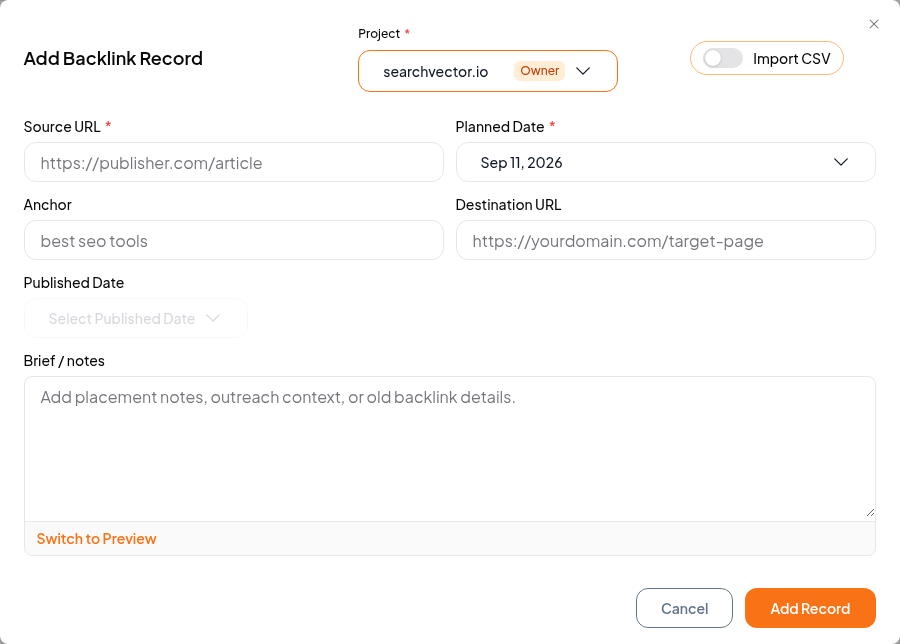
Planned placement
Source and target agreed; publication not yet verified.
Suggested note: “Waiting for publisher confirmation. Revisit the source page after the agreed publication date.”
Previously published link
Record the date and what you actually inspected.
Suggested note: “Reviewed the rendered source page on [date]. Anchor and target matched. Next review is a manual task.”