
Website Word Count
Count text from one public page or pasted HTML, compare body and main-content scopes, and calculate reproducible baselines for multi-page or translation reviews.
A page count you can inspect
A website word count is a count of one page, not the total content across a domain. Menus, footers and repeated navigation can increase body totals without adding to the main article.
Use Body text for the page’s text content after exclusions. Choose Main / article to count all main elements, or all article elements when no main exists. If neither exists, the tool asks you to choose Body text instead of silently guessing.
Know your scope
From page source to counted text
| Fetch | One anonymous public URL request, with up to three redirects. The final URL and HTTP status identify the source. |
| Exclude | Scripts, styles, head metadata, marked hidden content, embedded media, form values and image alt text. Stylesheet visibility is not evaluated. |
| Separate | Block elements and line breaks separate text. Inline formatting preserves words: “sun<em>light</em>” counts as one. |
| Count | Unicode letter/number runs, keeping internal apostrophes. “well-lit” is two; “don’t” is one; “2026” is one. |
Same example, two useful totals
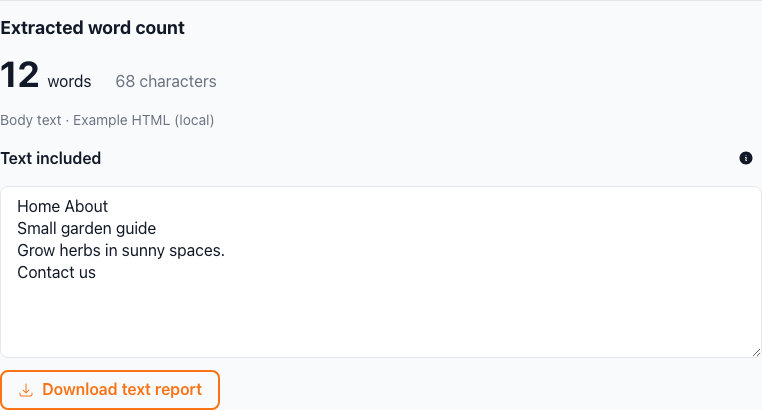
The interactive example contains “Home About”, a main heading “Small garden guide”, a paragraph “Grow herbs in sunny spaces.” and “Contact us”. Body text counts 12 words; Main / article counts 8. The hidden paragraph and page title contribute zero.
Change the scope and run the example again to inspect the difference. A smaller main-content count means surrounding page text was excluded; it is not a quality score.
Public HTML is limited to 1 MB and 200,000 characters; pasted HTML to 200,000 characters. For editing extracted copy, continue with the Word Counter.
Frequently Asked Questions
How to interpret your website word count