Search a few of your keywords on Google and count the plain blue links before the first scroll. On many searches there are hardly any. The space is taken by an AI answer, a box of questions, a map, videos or a row of products.
Those extras are SERP features. They change where people click, which means ranking third doesn’t mean what it used to. It also means there are more ways to get seen than a single blue link.
This guide is about finding those opportunities in a repeatable way. I’ll show you how to check which features appear for your keywords, how to choose the ones worth chasing and what kind of content gives you a fair chance at each.
What are SERP features?
A SERP feature is anything on a search results page that isn’t a standard organic result: a featured snippet, a People also ask box, an AI Overview, a local map pack, images, videos, product listings and more.
Some features take content from websites, so you can appear in them. Others come from Google’s own data or from ads. The point of research is to spot the first kind on searches that matter to your business.
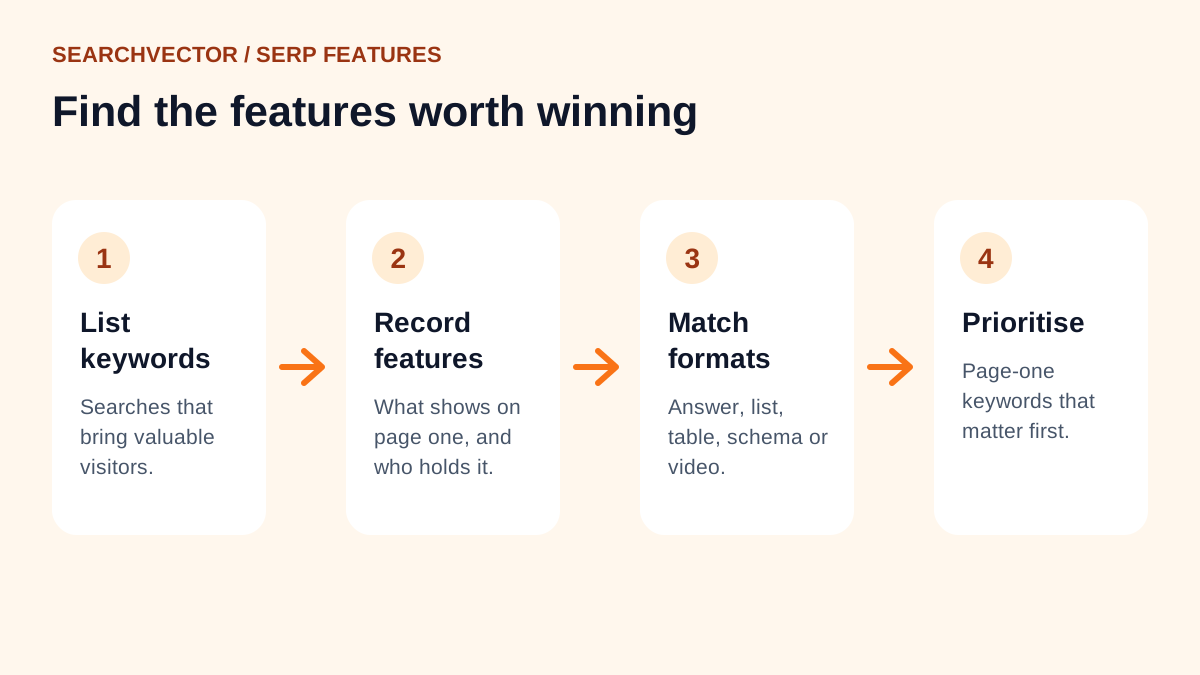
Step 1: Start with keywords you care about
Don’t start with a list of features and go hunting. Start with the searches that bring, or could bring, valuable visitors. A good source is the Queries report in Google Search Console, especially searches where you already get impressions.
Pick 20 to 50 keywords for a first pass. Include a mix of questions, comparisons and “best” or “near me” searches, because they tend to trigger different features.
Step 2: Record the features on each results page
Search each keyword and note what appears on page one. You can do this in a private browser window, or use our SERP checker to see the results for a keyword in a chosen country without your own search history affecting them.
For each keyword, I note four things in a sheet:
- Which features appear, and in what order.
- Whether my site appears anywhere on the page.
- Who holds each feature now.
- What format the winning content uses: a short definition, a list, a table, a video.
After 20 or 30 keywords, patterns jump out. You’ll see that question searches keep showing People also ask, that “how to” searches show videos, or that your service keywords are dominated by a map.
Step 3: Match each feature to a content format
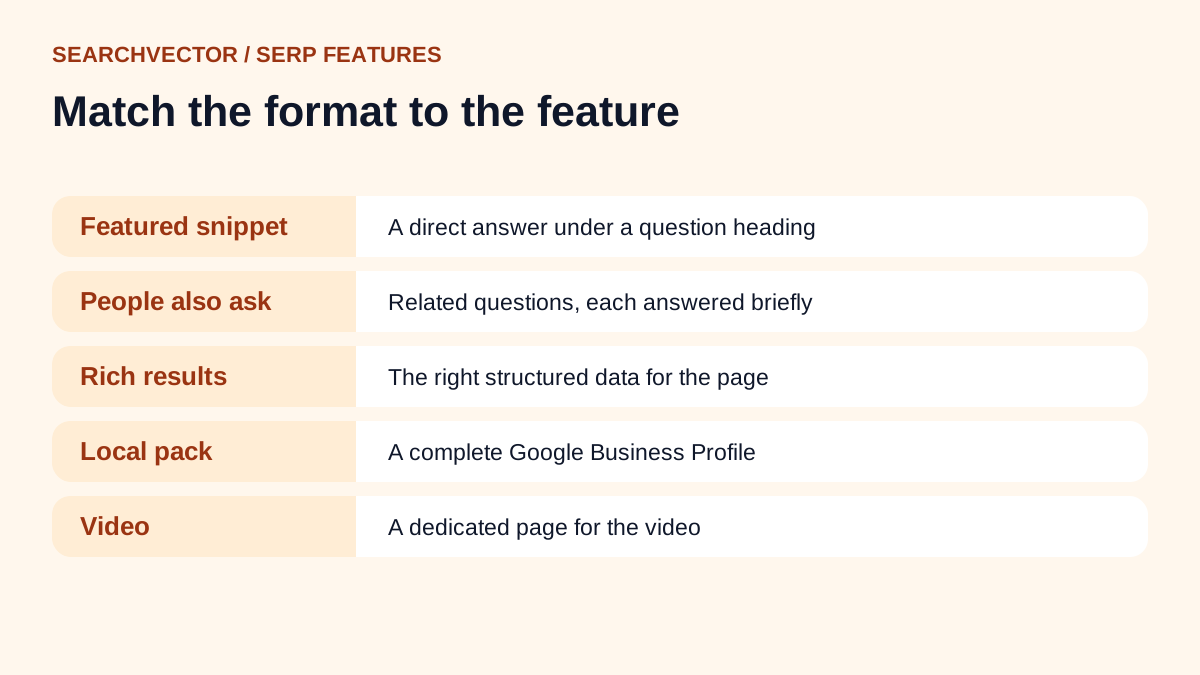
Featured snippets
A featured snippet is a short extract shown near the top of the results. Google chooses it automatically from pages it already ranks, and you can’t mark a page up to request one.
What helps: put the question in a heading and answer it in the first sentence or two below it. If the snippet is a list or table, use a clean HTML list or table. Most snippets come from pages already on page one, so these are the easiest wins.
People also ask
These expandable questions show what searchers want to know next. Each answer comes from a web page.
What helps: cover the related questions on your page, each with its own heading and a short, direct answer. The questions themselves are also excellent content ideas.
AI Overviews
AI Overviews summarise an answer and link to supporting pages. Google’s guidance on AI features says there are no additional requirements to appear in them beyond normal SEO best practices.
What helps: the same things that help any good page. Clear answers, original detail, accurate facts and a page Google can crawl and index.
Rich results
Rich results add extra details to a normal result, such as review stars, prices, recipes or event dates. They rely on structured data.
What helps: add the right structured data for your content type. Our schema generator can write it. Google says structured data makes a page eligible, but doesn’t guarantee the rich result will show.
Local pack
The map with three business listings appears for searches with local intent. It draws from Google Business Profiles rather than websites.
What helps: a complete and accurate Google Business Profile, the right categories and genuine reviews. Track your position with the local rank tracker.
Images and videos
Image packs and video results appear when a picture or a demonstration answers the search better than text.
What helps: original images with descriptive file names and alt text, and for video, a page dedicated to the video with a clear title and description. If a “how to” search shows mostly videos, a text guide may struggle there.
Sitelinks
Sitelinks are extra links under a result, usually for brand searches. Google generates them automatically. A clear site structure and descriptive internal links help Google pick sensible ones.
Step 4: Decide which features to go after
You won’t win every feature, and you don’t need to. I score each opportunity by three questions:
- Do I already rank on page one? If yes, a featured snippet or People also ask spot is within reach.
- Does the feature fit my content? A software company shouldn’t chase a local pack it can’t qualify for.
- Is the search valuable? A feature on a search that never leads to a customer isn’t worth much effort.
Start with the keywords that pass all three. Usually that’s a handful of question searches where you already rank between positions two and ten.
Step 5: Update and check again
Make the change, such as a clearer answer, a new FAQ section or added structured data. Then check the results page again after a few weeks. Features change often, so this is a habit, not a one-off project.
Track the pages you changed with a rank checker, and watch their clicks in Search Console. Winning a feature should show up as more clicks, not just a better position.
Mistakes to avoid
- Writing vague introductions that delay the answer.
- Adding FAQ sections full of questions nobody asks.
- Expecting structured data to guarantee rich results.
- Chasing features on searches with no business value.
- Checking results once and assuming they never change.
Frequently asked questions
1. What is a SERP feature?
It’s any element on a search results page that isn’t a standard organic link, such as a featured snippet, People also ask box, AI Overview, map pack, image pack or video carousel.
2. What are the different types of SERP features?
The common ones are featured snippets, People also ask, AI Overviews, rich results, local packs, image and video results, sitelinks, top stories and shopping results. Ads also appear as paid features.
3. How do I find which SERP features my keywords trigger?
Search each keyword and record what appears, ideally in a private window or with a SERP checker that lets you choose the country. Do it for a set of keywords so you can spot patterns.
4. What is the difference between SERP and SEO?
The SERP is the search engine results page itself. SEO is the work you do to make your pages appear on it and earn clicks.
5. Do SERP features reduce clicks to websites?
Some searches get answered on the results page, so fewer people click. But appearing in a feature can also make your result more visible. That’s why it pays to know which features show for your keywords.