Most lists of SEO tools give you twenty-five products and no idea where to start. I find it more useful to flip the question. Instead of asking which tool is best, ask which on-page job you need done today, then pick the simplest tool that does it well.
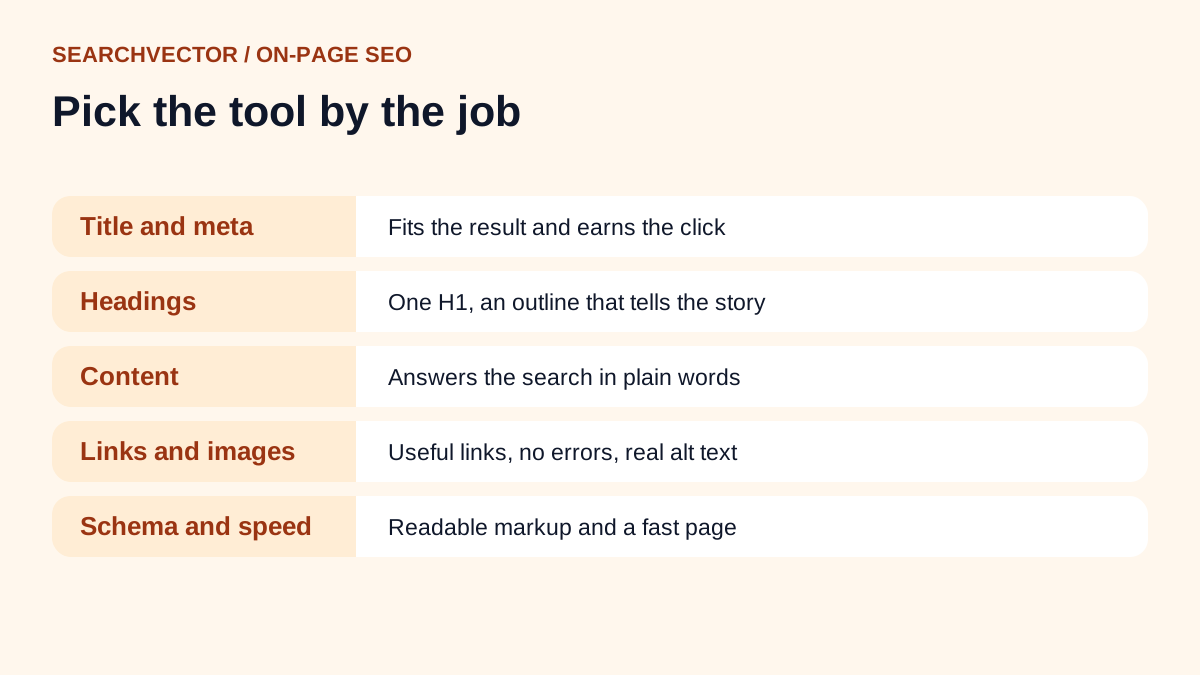
On-page SEO is a short list of jobs: the title, the description, the headings, the content, the links, the images, the structured data and the speed. Each one has a free check you can run in a few minutes. You don’t need an expensive suite to get most of them right.
Below I go through each job, what “good” looks like and the tools I would use. I’ve stuck to free tools: our own SearchVector checkers and the free tools Google provides for site owners.
What makes an on-page SEO tool worth using
Before the list, here’s how I judge a tool. It should pass at least three of these:
- It checks the live page, or the HTML you paste, rather than guessing.
- It tells you what to change, not just a score out of 100.
- It’s quick enough to use while you edit.
- It doesn’t lock the basic result behind a sign-up.
A score feels nice, but it rarely tells you what to do next. A tool that says “your title is 72 characters, so it may be cut off” is far more useful than one that says “67/100”.
1. Title tags and meta descriptions
The title tag is still the strongest on-page signal you control, and it’s the first thing people read in search results. The meta description doesn’t directly change rankings, but it shapes whether someone clicks.
What good looks like: one clear title per page that includes the main keyword near the start and fits in the result without being cut. A description that gives a concrete reason to click.
Tools I use:
- Title and meta checker to review the current title and description of any URL, with character counts and a search preview.
- SERP snippet generator to draft new versions and preview them on desktop and mobile before you publish.
- SEO title generator when I’m stuck for an angle.
Google’s own guidance on title links is worth a read too. It explains why Google sometimes rewrites your title in results.
2. Headings
Headings are the outline of your page. Readers scan them to decide whether to stay, and search engines use them to understand how the page is organised.
What good looks like: one H1 that matches what the page is about, then H2s for the main sections and H3s inside them. No empty headings, and no headings used just to make text bigger.
Tool I use: the H1 checker. It counts H1s on a URL or pasted HTML, flags empty headings and shows the full H1 to H6 outline. Reading that outline on its own is a great test. If it doesn’t make sense without the body text, the structure needs work.
3. Content and keyword use
This is where people overthink it. You don’t need to hit a magic keyword density. You need to answer the search clearly, use the words people actually search for and cover the questions they have.
What good looks like: the main keyword appears naturally in the title, the first paragraph and at least one heading. Related phrases show up where they make sense. Nothing reads as if it was written for a robot.
Tools I use:
- Keyword density checker as a sanity check. Paste your copy and focus keyword to see density and repeated phrases. I use it to catch overuse, not to chase a number.
- Website word count to compare how much text a competing page has. It counts words in a public page’s HTML and shows the extracted text.
- Keyword research tool to find the phrases and questions people use, so the page covers them.
4. Internal and external links
Internal links help visitors find the next useful page, and they help search engines discover and understand your content. Broken links do the opposite.
What good looks like: every important page gets links from related pages, with anchor text that describes the destination. No links pointing to errors or long redirect chains.
Tools I use:
- Internal links checker to see a page’s internal and external links, anchor text and follow status.
- Broken link checker to catch links that lead nowhere.
- URL status code checker to inspect a single URL’s status and redirect chain.
5. Images and alt text
Alt text describes an image for people using screen readers, and it gives search engines context about the picture. It’s also one of the most commonly skipped jobs.
What good looks like: every meaningful image has a short, specific description. Decorative images use an empty alt attribute so screen readers skip them.
Tools I use: the alt tag checker to find missing and empty alt attributes in pasted HTML, and the image alt text generator, which turns a short description of an image and its page context into concise alt text. I still read every result before using it.
6. Canonical tags and language versions
These matter most when the same content can appear at more than one URL, or when you publish in several languages. Get them wrong and the wrong version may show in results.
Tools I use: the canonical checker to see which canonical a page declares and spot conflicts, and the hreflang checker to review language alternates and missing self-references.
7. Structured data
Structured data tells search engines what a page contains in a format they can read reliably: an article, a product, an FAQ, a local business. It can make a page eligible for richer search results, though it doesn’t guarantee them.
Tools I use: our schema generator to write the markup, then Google’s free Rich Results Test to confirm Google can read it.
8. Page speed and Core Web Vitals
A slow page frustrates people before they read a word. Core Web Vitals measure loading (LCP), responsiveness (INP) and visual stability (CLS).
Tools I use: Google’s PageSpeed Insights to get the numbers, then our Core Web Vitals checker to read the LCP, INP and CLS results with field and lab data kept separate. The page size checker helps when a page is simply too heavy.
The free tools from Google you should already have
Whatever else you use, set up Google Search Console. It’s free and it’s the only place that shows how Google itself sees your site: which queries bring clicks, which pages are indexed and which have problems.
When a specific page isn’t showing up, our Google index checker walks you through the checks to confirm whether Google can discover, crawl and index it.
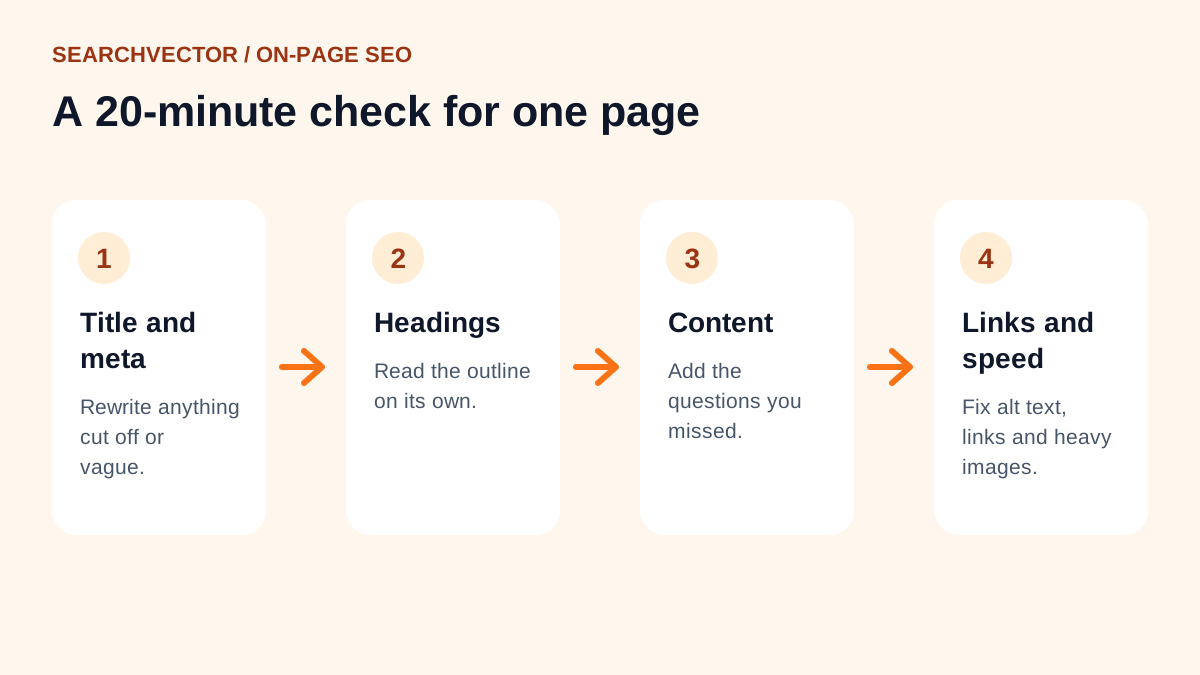
My 20-minute on-page routine
When I review a single page, I go in this order. It catches most problems without turning into a full audit.
- Check the title and description. Rewrite them if they’re cut off or vague.
- Read the heading outline on its own. Fix it if it doesn’t tell the story.
- Compare the content with what already ranks. Add the questions you missed.
- Add two or three internal links to and from related pages.
- Fill in missing alt text.
- Run a speed check and fix anything obvious, like a huge image.
When you need to do this across a whole site, a crawler-based site audit saves you checking pages one by one.
Mistakes I see with on-page SEO tools
- Chasing a score instead of reading what the tool found.
- Stuffing keywords to hit a density target.
- Fixing the homepage ten times and never touching the pages that get traffic.
- Running checks once and never again after a site update.
- Trusting AI-written alt text or titles without reading them.
Frequently asked questions
1. Which tool is best for on-page SEO?
There isn’t one tool that does every job best. Start with Google Search Console for how Google sees your site, then use focused checkers for titles, headings, links, images and speed.
2. Are free on-page SEO tools good enough?
For a single page or a small site, yes. The checks that matter most, like titles, headings, alt text and links, are simple to run for free. Paid tools help once you need to monitor many pages over time.
3. What is the difference between on-page and technical SEO?
On-page SEO is about the content and HTML of a page: titles, headings, text, links and images. Technical SEO covers how the whole site is crawled and served, like indexing, redirects, speed and site structure. The two overlap a lot.
4. How often should I check on-page SEO?
Check a page when you publish it and when its traffic drops. For important pages, a quick review every few months catches broken links and outdated content.
5. Is on-page SEO still worth it with AI search?
Yes. Clear titles, well-structured headings and direct answers make a page easier for any system to understand, whether that’s a classic search result or an AI summary.